



About AxManager APK
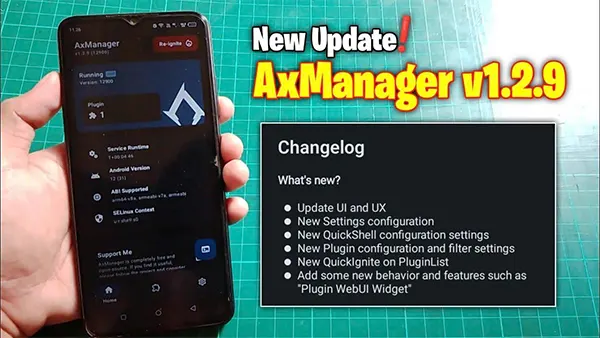
AxManager APK is a system management utility designed to let users execute Android shell commands, organize scripts, manage plugins, and interact with a WebUI dashboard through a clean and user-friendly interface. Unlike many tools that hide behind flashy marketing, AxManager keeps its identity clear: it is a functional, lightweight, developer-focused application.
The project began as an open-source initiative hosted on GitHub, where the original developer built a modular system to simplify shell task management. Over time, community feedback led to updates that made the tool faster, more accessible, and compatible with a wider range of Android devices. Today, AxManager continues to evolve with improvements contributed by developers who value transparency and stability.
One important clarification for new users: AxManager APK is not a performance-modifying program or a tool that manipulates restricted system components. Instead, it serves as a bridge between advanced system tasks and users who prefer a clean interface rather than traditional terminal applications. This clear positioning helps minimize user confusion and sets realistic expectations.
Core Features of AxManager APK That Define Its System-Level Capabilities
The strength of AxManager APK lies in its feature set. Although simple on the surface, each feature offers depth and flexibility for users at different technical skill levels.
Shell Executor
The built-in shell executor allows users to run Android terminal commands directly within the app. This is useful for developers testing scripts, modders organizing workflows, or power users who want fine control without installing a separate terminal application.
WebUI Dashboard
One of the standout features is its browser-based WebUI. Users can connect their device to a local network and access AxManager from a desktop browser. This is particularly convenient for long command sessions or organizing scripts without navigating on a small mobile screen.
Plugin and Module System
AxManager supports plugins that can extend its functionality. These plugins allow the app to become more than just a command executor—they can assist with automation, manage device configurations, or perform device-specific tasks depending on user needs.
Lightweight and Compatible
The APK is remarkably lightweight and doesn't demand high resources. It runs efficiently on modern Android versions and supports both rooted and non-rooted devices, although certain advanced tasks naturally require additional permissions.
Overall, the features are thoughtfully designed to balance functionality with safety, making AxManager APK a reliable tool for users who want deeper Android control.
How AxManager APK Works Internally to Manage Commands and Tasks
While AxManager looks simple, its internal mechanics reveal a smart, efficient architecture. When a user executes a command through the Shell Executor, the app communicates with Android’s shell environment using standard APIs and permissions. It processes the command, returns system responses, and logs output for easy review.
Plugins operate by integrating additional instructions or modules into the shell environment. This modular design keeps the app flexible without compromising stability. For example, a plugin may add shortcuts for battery monitoring, device cleanup routines, or system information retrieval.
The WebUI works by hosting a lightweight local server inside the app. When the user connects through a browser, the WebUI mirrors AxManager’s interface and interacts with the device in real time. This setup ensures that sensitive data never leaves the device, adding an extra layer of security.
The architecture reflects one of the key values of AxManager: transparency. Users can understand how tasks are executed, how plugins interact, and how data flows inside the app—something many closed-source tools fail to provide.
Practical Benefits of AxManager APK for Developers, Modders, and Power Users
Different users approach AxManager APK with different goals. From hands-on testing, here are some of the most practical benefits:
Efficient Task Automation
Developers can automate repetitive tasks using custom scripts, significantly reducing workflow time.
Faster Debugging and Testing
Running shell commands directly in AxManager makes debugging easier. Users can execute commands, check output, and adjust scripts without switching tools.
Remote Management via WebUI
This is especially useful for long coding or testing sessions, where typing commands on a keyboard is far more efficient than on a touchscreen.
Non-Root Convenience
Many system tools require root access to do anything meaningful. AxManager offers plenty of functionality even without root, making it accessible to a larger audience.
Modding and System Tuning (Community-Based)
Although the app itself does not modify device performance, users often pair it with community-made plugins that help manage system settings or automate maintenance routines. This flexibility is one reason it has gained traction among Android modders.
These realistic benefits show why AxManager appeals to both beginners and experienced developers.
AxManager APK vs. Similar Tools — What Makes It Stand Out
While several tools offer system-level control, AxManager APK stands out due to its balance of simplicity and flexibility.
Compared to Magisk, which focuses on root modules, AxManager is not tied specifically to root access and remains lightweight. Unlike Termux, which is fully terminal-based, AxManager presents a cleaner interface that reduces the learning curve for less technical users. Meanwhile, tools like Shizuku focus on permission management, whereas AxManager integrates both scripting and plugin management in one environment.
This makes AxManager ideal for users who want powerful command execution without installing multiple specialized apps.
How to Use AxManager APK Effectively for Commands, Plugins, and Automation
Once AxManager is running, you’ll see a clean dashboard with simple navigation. Here’s how to make use of its key functions:
Running Shell Commands
Go to the Shell tab, enter a command, and execute. The app logs output immediately.
Using Plugins
Place plugin files in the AxManager plugin directory. The app will detect them automatically. Plugins can add new commands, shortcuts, or system information tools.
Using WebUI
Open your browser and connect to the device’s local IP and port shown in AxManager. This mirrors the interface and allows remote execution.
Example Tasks
-
Checking CPU information
-
Listing installed packages
-
Creating automated cleanup scripts
-
Running ADB-like commands locally
Each task can be performed safely as long as users avoid risky commands. AxManager offers power, but it respects system boundaries.
Troubleshooting AxManager APK — Fixing Errors, Crashes, and Compatibility Issues
Some common issues users may encounter include:
Shell Execution Fails
This usually happens due to missing permissions. Grant storage and file management access or restart the app.
Plugin Not Detected
Check whether the plugin is in the correct folder and uses supported formats.
WebUI Not Loading
Ensure the device and the PC are on the same Wi-Fi network and the correct IP address is used.
App Crashes
Clearing app data or reinstalling often solves this. Some devices with heavy system restrictions may need additional configuration.
Most problems can be resolved quickly by reviewing permissions or reinstalling clean files from the official source.
Conclusion
AxManager APK is a standout utility for Android enthusiasts who want a lightweight, reliable, and flexible tool for automation, command execution, and plugin management. Its thoughtful design, open-source transparency, and WebUI convenience make it a practical choice for developers, modders, and power users alike.
For the best experience, download AxManager only from trusted sources and use commands responsibly. If you want the safest version, clear installation guidance, and user-friendly support, you can find everything you need on ModFyp.
Explore more or download the verified AxManager APK at ModFyp today.